HCMToGo
- 3.6
- Rating
- 1.00M
- Installs
- Free
- Price
 Analysis by App-foxy
When work depends on schedules, attendance, employee information, and routine administrative tasks, the real challenge is rarely finding one more app. It is creating a dependable habit around the tools a workplace already uses. I found HCMToGo most useful when I treated it as a mobile access point for work-related human resources tasks rather than as a complete replacement for every desktop process. That distinction matters: the app can make everyday checks more convenient, but its value depends heavily on how an employer has configured the wider Workforce Ready system.
Developed by Workforce Ready, this free Business app is the modern version of the TotalHRWorks Mobile App. It is aimed at employees and managers who need to stay connected with workplace information while away from a computer. The audience is broad enough to include people checking their own employment details as well as supervisors handling routine workforce responsibilities, although the exact experience can vary between organizations.
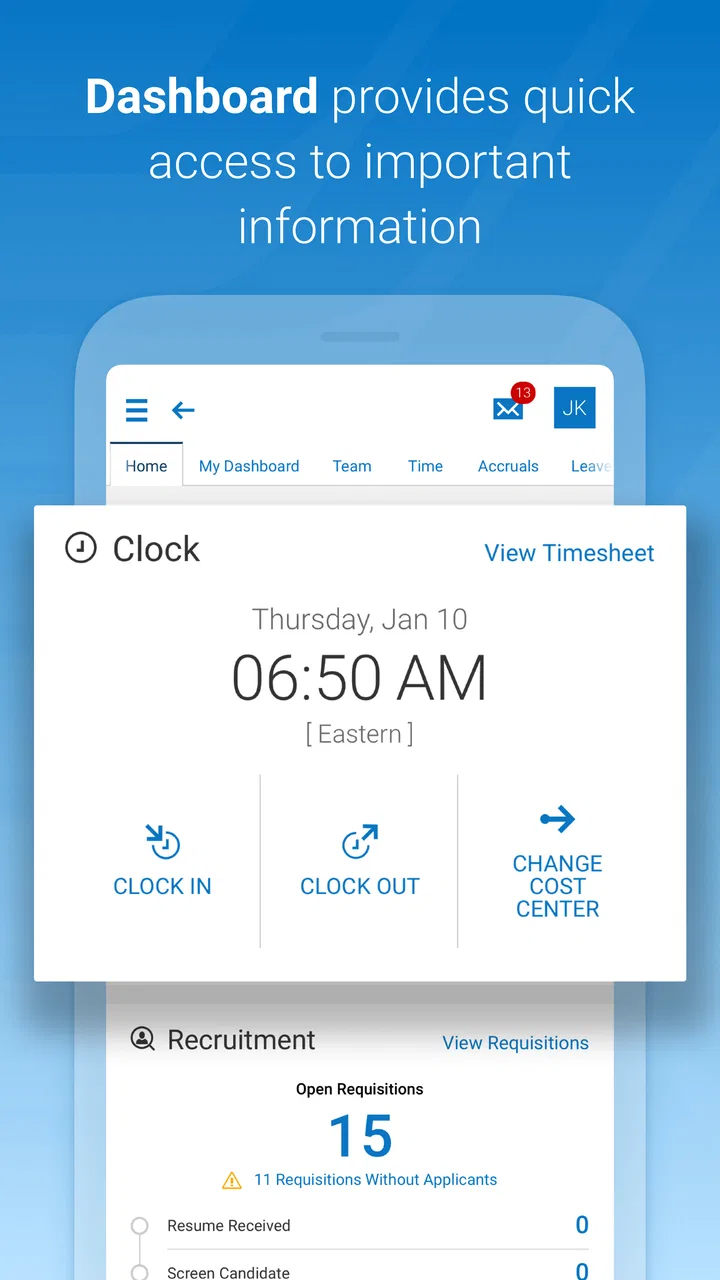
My overall impression is practical rather than flashy. HCMToGo is best understood as a companion for recurring work actions: checking something before a shift, reviewing a schedule, recording an update, or keeping an eye on information that would otherwise require opening a browser or contacting an administrator. It has passed the point of being a niche download, with over a million installs, but its average rating of 3.6 from around eleven thousand ratings suggests that convenience and reliability are not equally felt by everyone.
You May Also Like

 Blood Strike: 2.5 Anniversary
Blood Strike’s Loadouts Turn Every Drop Into a Tactical Gamble
A close look at Blood Strike’s custom loadouts: how fast access to signature weapons reshapes its battle royale rhythm, rewards preparation, and narrows the gap between fights.

 Pandora - Music & Podcasts
Pandora’s Music Is Easy to Start, but Harder to Recover
Pandora’s strength is its low-effort path from a seed to a station. Its weak spot is how much confidence it asks you to place in connection, setup, and quiet recovery.

 8 Ball Pool
 Is Built on Rivalries, Rematches, and Routine
A close look at the rivalries, rematches, shared routines, and unanswered safety questions that turn a quick pool match into a persistent mobile community.

 Samsung Music
’s Quiet Strength Is Playing What You Already Own
Its reach comes less from spectacle than from dependable access to a personal library. That simplicity is both the app’s strongest retention engine and its ceiling.

 AccuWeather: Weather Radar
AccuWeather Review: A Quick, Clear Forecast for Everyday Decisions
For everyday plans, the best forecast is the one you can understand quickly. AccuWeather makes rain timing, radar, and local conditions easy to act on, with a few trade-offs.

 Hill Climb Racing
Why Hill Climb Racing Still Turns Crashes Into One More Run
A tiny car, a bumpy hill and one more upgrade: Hill Climb Racing keeps resurfacing because its simple chaos makes every near-miss feel personal.
More From Our News Desk



Build the workflow before opening the app
The strongest way to use HCMToGo is to decide what you want it to solve before you sign in. If the goal is simply “use the HR app more,” it can become another icon that gets ignored. A better starting point is to identify the few moments in the workday when a mobile check would prevent delay. For one employee, that may be reviewing a schedule before leaving home. For another, it may be checking a time-related entry after a shift. A manager may use it to keep routine workforce information within reach instead of waiting until they return to a desk.
I would not begin by exploring every available screen. I would first write down the regular questions that create friction at work: What am I working today? Did my recent update go through? Is there something I need to review before payroll or scheduling is finalized? That small preparation turns the app into part of a process instead of an isolated utility.
This approach also helps set realistic expectations. HCMToGo is tied to a workplace’s use of Workforce Ready, so it is not a general-purpose personal organizer. It will not replace a calendar, task manager, messaging app, or full desktop HR platform. Its job is narrower and more useful when that narrow job is clear: give authorized users a mobile route to work information and actions that their organization has made available.
A realistic example is a retail employee who checks the next shift before commuting. Instead of opening a laptop, searching through messages, or asking a supervisor, the employee can make the app part of the evening routine. The benefit is not one dramatic feature; it is the reduced number of small interruptions. If the employee also reviews any pending workplace information at the same time, the app becomes a single checkpoint before the next day begins.
For managers, the workflow may look different. A supervisor might use the app between meetings to review a staffing detail or respond to a routine item, then reserve a desktop session for deeper administrative work. That division is important. Mobile access is convenient for short decisions, while larger changes, careful comparisons, and extended data entry are usually easier on a bigger screen.
Capture information without creating a second system
One of the easiest mistakes is to use HCMToGo as a place to look at information while keeping a separate, unofficial record somewhere else. That creates uncertainty about which record is current. I found it more sensible to use the app as the place where I check the official workplace information, then capture only the next action I personally need to remember. For example, I might note a shift in my personal calendar, but I would return to the app whenever I needed to verify the source.
This distinction is especially helpful for schedules and time-related details. A personal calendar is good for reminders, travel planning, and preparation. It is not necessarily the authoritative workplace record. HCMToGo should remain the reference point for what the organization has published or recorded, while a separate reminder system can handle personal planning. Keeping those roles separate avoids the common problem of trusting an old copied detail.
For employees, a useful routine is to check the relevant information at a natural transition: before leaving for work, after finishing a shift, or at the end of the week. The exact timing is less important than consistency. Repeatedly opening the app at a predictable moment makes it easier to notice an unexpected change or unfinished action before it becomes urgent.
For managers, the same principle applies but with an extra layer of care. Mobile screens encourage quick taps, and quick taps are not always appropriate for sensitive workforce decisions. I would use the app for straightforward reviews and routine follow-up, then move to a larger interface when the task requires comparing several people, checking context, or entering information that deserves a second look.
A less obvious advantage of this approach is that it creates a clean handoff between mobile and desktop work. The phone handles awareness and small checks; the computer handles concentration-heavy administration. That is more sustainable than expecting one device to do everything. It also reduces the temptation to make a rushed change merely because the mobile option is available.
Turn recurring checks into a repeatable routine
HCMToGo makes the most sense when attached to a repeatable routine rather than used only when something goes wrong. I would build a short sequence around it: open the app, check the item that matters most, deal with anything actionable, and close it. The routine should be short enough to repeat and specific enough to prevent aimless browsing.
For an employee, that sequence could happen at the start of a workday. First, confirm the relevant schedule or work information. Next, look for anything that requires attention. Finally, record a personal reminder elsewhere only if it helps with travel, preparation, or time management. This keeps HCMToGo focused on workplace truth while still connecting it to daily life.
For a manager, a weekly review may be more valuable than constant checking. A supervisor could choose a quiet point before the week begins to review the information needed for staffing and follow up on routine items. During the week, the app then becomes a quick reference rather than a source of repeated, unnecessary interruptions.
The key trade-off is convenience versus depth. A mobile app is excellent for reducing the distance between a question and its answer. It is less comfortable for long sessions, detailed review, or tasks that require several windows of context. I would therefore avoid designing a process that depends on completing every HR responsibility on a phone. The sustainable system uses HCMToGo where speed and access matter, not where a desktop workflow is plainly better.
Another useful habit is to verify important information before acting on it. If a schedule, time entry, or workplace detail affects travel, pay, or a conversation with a supervisor, I would take a moment to confirm that I am looking at the current record and the correct work period. This is not a criticism unique to HCMToGo; it is a sensible safeguard whenever a compact mobile interface presents information that may change.
The app’s free price makes this routine easier to recommend to employees who need mobile access without adding a personal subscription. The practical question is not whether the download costs money, but whether the person’s organization supports the relevant Workforce Ready connection and whether the available functions match the person’s role. The app can be free to install and still depend on workplace access for its usefulness.
Where the experience can break down
The main friction point is that the app cannot independently solve an organization’s setup or communication problems. If an employee cannot sign in, sees incomplete information, or does not understand which action belongs in the app, the solution may involve an employer administrator rather than another tap inside the phone. That dependency can make the experience feel inconsistent from one workplace to another.
This is also why I would be cautious about judging the app solely by a single successful session. A mobile HR tool proves its value through repeated, dependable use. If it works well for a quick check but becomes awkward when a user needs context, the right response may be to shift that part of the workflow to the desktop version rather than force the phone to carry the entire process.
Small-screen interaction is another natural limitation. Reviewing one item at a time can be comfortable, but scanning a large amount of information or comparing several records is more demanding. Managers who need a broad operational view should not assume that mobile access is the best interface for every decision. HCMToGo is more convincing as an extension of workforce management than as the only place to manage it.
The rating history reflects that mixed reality. With a 3.6 average and roughly four thousand three hundred written reviews, the app has a substantial body of user feedback, but the score is not a signal of universal smoothness. I read that as a reason to test it against your actual workplace routine: can you reach the information you need, understand what it means, and complete the small tasks you are responsible for without unnecessary detours?
It is also worth keeping the app current. The version available for review is 1.103.6, and the minimum operating system is iOS or Android version 11, depending on the device platform. Keeping a compatible phone and current installation is a simple maintenance step, especially for an app used for recurring work rather than occasional browsing.
The Everyone content rating makes it broadly suitable from an age-classification perspective, but that should not be confused with universal workplace access. The information inside a business app is still role-dependent and connected to an employer’s system. I would treat the phone as a personal access device, keep normal device security habits, and avoid sharing an account simply because the app is convenient.
Who should adopt it, and who should choose another route?
I would recommend HCMToGo to employees whose workplaces already use Workforce Ready and who regularly need mobile access to their work information. It is particularly appropriate for people who move between locations, do not sit at a desk, or need a quick check before and after a shift. The app can remove a surprising amount of low-level friction when the same questions come up every week.
It is also a reasonable fit for managers who need a mobile companion for routine workforce follow-up. The important qualification is the word “companion.” I would not make it the sole tool for complex personnel administration, extended reporting, or careful multi-record work. A desktop interface, or the organization’s established administrative process, will often be more suitable for those jobs.
I would skip it if you are looking for a general productivity app, a personal calendar, or an independent employee-management platform. HCMToGo is not designed to organize every part of life or work. Its usefulness begins when there is an existing Workforce Ready environment behind it. Without that connection, the download alone does not provide a meaningful workflow.
I would also hesitate if your workplace does not clearly explain how the app fits into its procedures. Before relying on it, ask which tasks employees are expected to complete there, which information remains desktop-only, and whom to contact when access or records look wrong. Those answers determine whether the app will save time or simply add another place to check.
Compared with the usual alternatives, HCMToGo occupies a practical middle ground. A browser-based HR portal may offer a wider view, but it can feel slow when the only need is a quick mobile check. Email and messaging are familiar, but they scatter information and can leave employees unsure whether a message reflects the official record. A personal notes app is flexible, yet it depends on manual copying and can become outdated. HCMToGo is strongest when the goal is direct access to the organization’s own workforce information, not when the goal is broad personal organization.
After using it as part of a structured routine, I see the app as a useful but bounded tool. Its best contribution is not novelty; it is bringing recurring workplace checks closer to the moment they matter. The trade-off is that the quality of the experience depends on the employer’s setup, the user’s role, and the willingness to move complex work to a better interface.
For someone deciding whether to install it, my advice is simple: adopt it if you already belong to a Workforce Ready workplace and have a clear mobile task to support. Start with one reliable routine, keep personal reminders separate from official records, and use a desktop workflow when the screen or context becomes limiting. With that approach, HCMToGo can become a sensible part of a sustainable productivity system rather than another app that demands attention without reducing effort.
FAQs for HCMToGo
01What is HCMToGo and what are its main features?
HCMToGo is a comprehensive human capital management application designed for businesses to manage their workforce more effectively. Its main features include time tracking, scheduling, payroll management, and employee self-service portals. The app integrates seamlessly with various HR systems, providing a unified platform for managers and employees to access important HR functions on the go.
02Is HCMToGo compatible with both Android and iOS devices?
Yes, HCMToGo is compatible with both Android and iOS devices. The app is available for download on the Google Play Store and the Apple App Store, ensuring that users can access its features regardless of their device preference. This compatibility ensures flexibility for businesses with diverse technology environments.
03How secure is the data stored in HCMToGo?
HCMToGo prioritizes data security by implementing advanced encryption protocols and secure login processes. The app ensures that all sensitive information, including payroll and personal employee data, is protected against unauthorized access. Regular updates and security patches further reinforce its commitment to maintaining user data privacy and security.
04Can employees manage their schedules and time-off requests through HCMToGo?
Yes, employees can easily manage their schedules and submit time-off requests directly through HCMToGo. The app provides an intuitive interface where employees can view their upcoming shifts, request changes, and communicate with managers. This feature enhances transparency and efficiency in schedule management within an organization.
05Does HCMToGo offer customer support for troubleshooting?
HCMToGo provides robust customer support options to assist users with any technical issues or inquiries. Users can access support through in-app help sections, FAQs, or direct contact with customer service representatives. This ensures that any problems encountered are addressed promptly, maintaining smooth operation and user satisfaction.
Pros
- User-friendly interface for easy navigation.
- Real-time updates ensure timely information.
- Customizable features for diverse needs.
- Seamless integration with existing systems.
- Robust security measures protect data.
Cons
- Initial setup can be time-consuming.
- Limited offline functionality.
- Occasional sync issues reported.
- Some features are behind a paywall.
- Customer support can be slow to respond.

HCMToGo
Gallery